 DevMap
Product · Map
See how your projects depend on each other.
The Map draws the relationships DevMap can actually find, and says why each link exists.
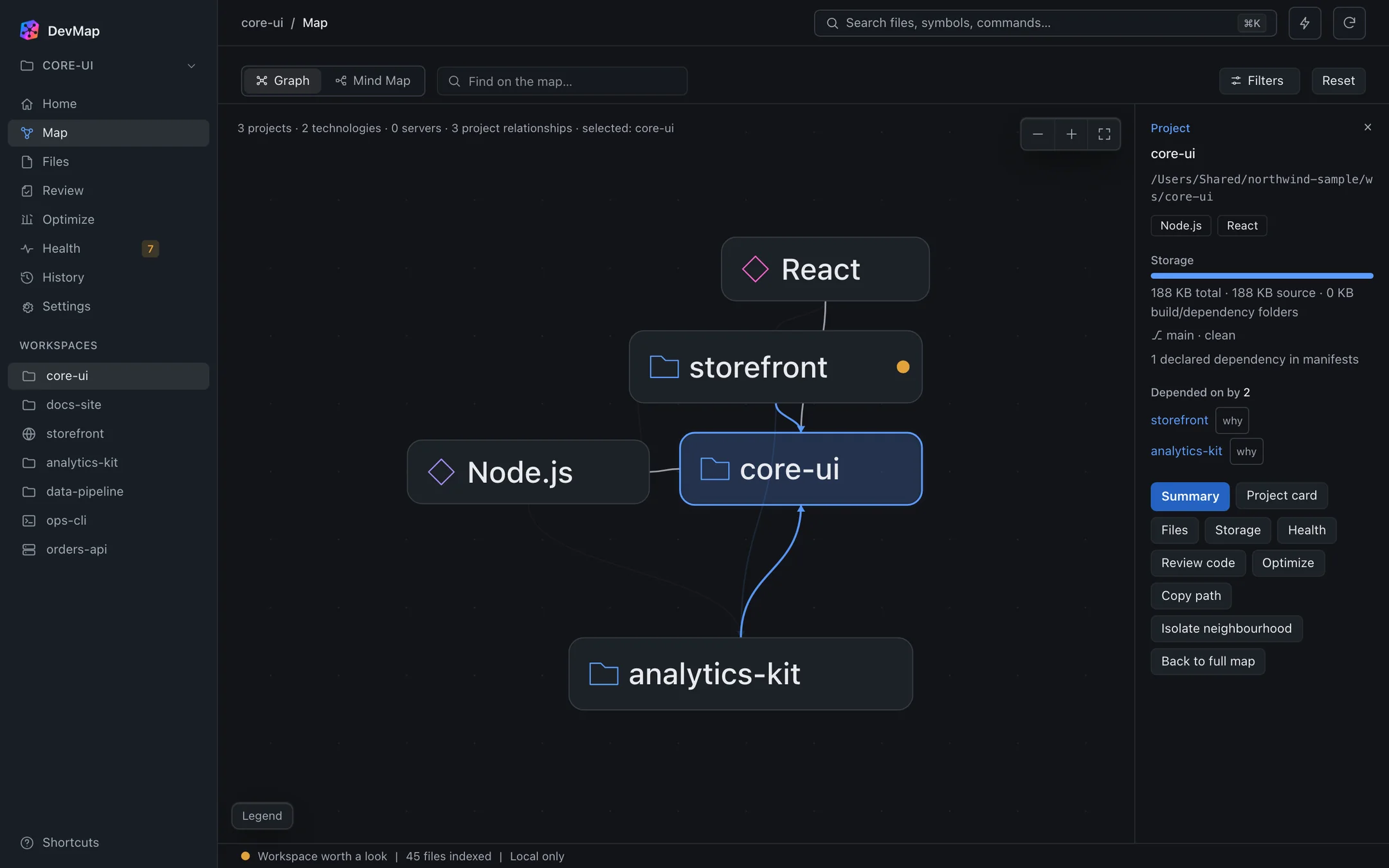
What the Map shows
Projects and what they use
Cards represent projects, with the technologies and servers they relate to.
Arrows with a reason
Links come from manifests, workspace declarations and imports. The inspector names the reason for the selected link.
Uncertain links are dashed
A weaker link is drawn dashed and called a candidate in the inspector and legend, so confirmed and candidate differ without relying on colour.
How it works
Explore one project at a time.
Pick a project
Select a card to isolate it. Only that project and its direct links stay in focus.
Read the inspector
The inspector shows what the project depends on and what depends on it. In the capture, core-ui reads “Depended on by 2”: storefront and analytics-kit.
Follow a link
Choose a related project to move through the graph, and jump from the Map to Files or the Mind Map for the same project.
When it helps
Before you change a shared library.
Select the shared project to see what depends on it. You know which other projects to check before you rename or restructure something.
Imports are read for JavaScript, TypeScript and Python. For other languages, only manifest-level path dependencies are mapped, so absence of a link there is not proof of independence.